Train with data, not guesswork.
PowerLog tracks your workouts, nutrition, sleep, and body measurements, then tells you when to push harder, back off, or adjust. Pay once, and your data stays on your phone.


One-time purchase. No subscription, no ads.
Need a plan? Create your own workout plan in your browser.
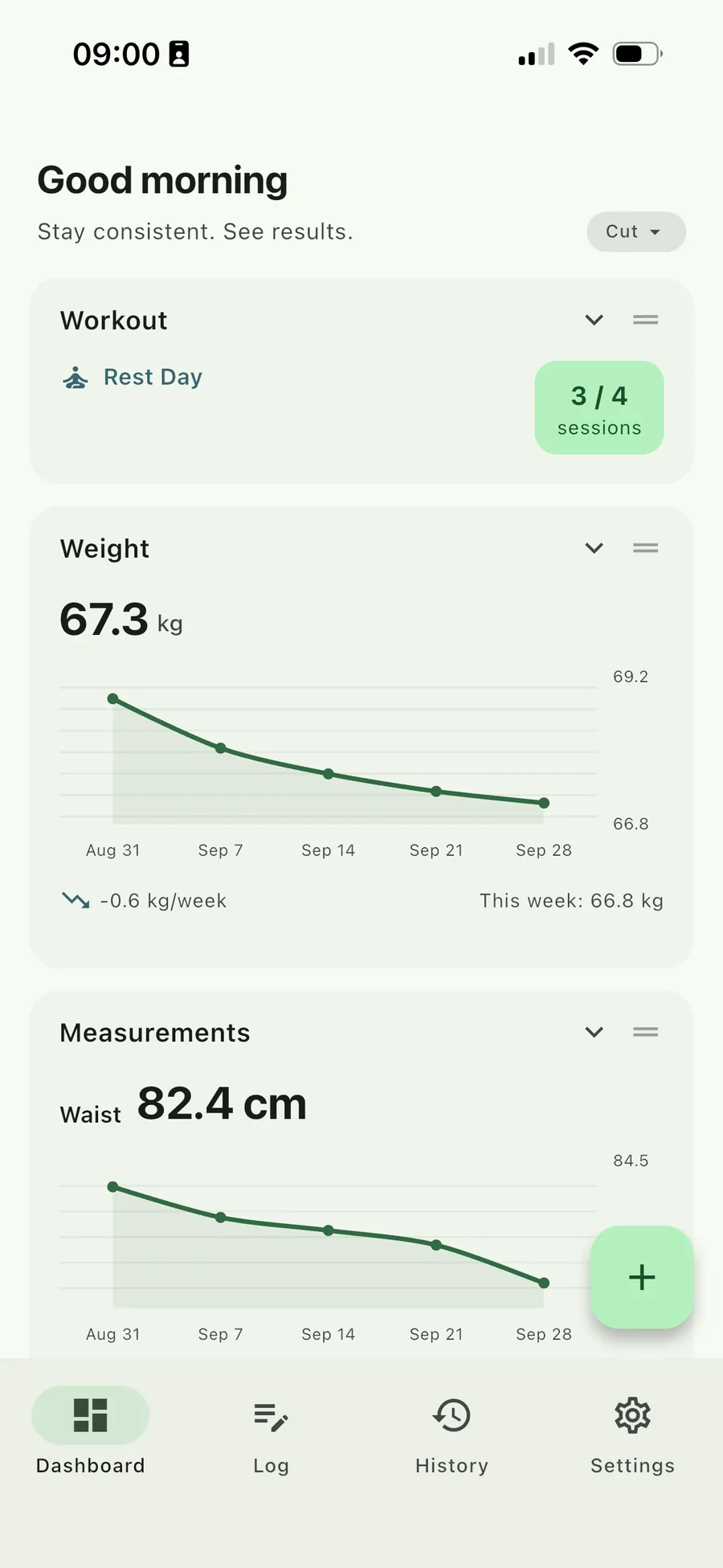
It tells you what to do next
Progress in the gym depends on more than the gym. PowerLog keeps your sleep and nutrition next to your training, so when progress stalls, it can help you find out why.
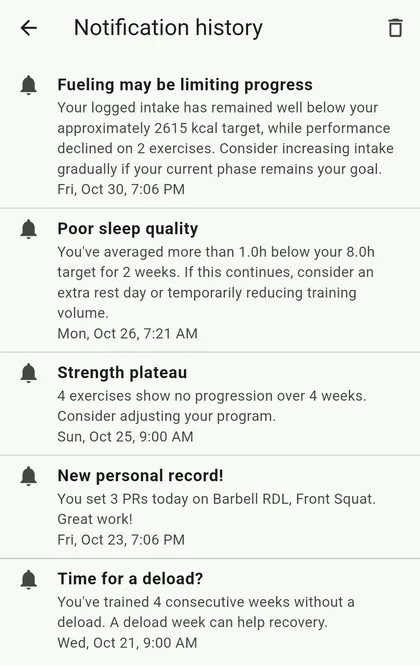
Smart notifications
33 rules watch your weight trend, plateaus, training load, sleep, and recovery. When progress stalls, PowerLog checks whether sleep or nutrition could be the reason. It all runs on your phone, not in the cloud.
Progressive overload
Get a weight or rep suggestion the moment you're ready to progress, tuned to your equipment and RPE.
Deload management
Trigger a deload week and PowerLog handles the weight and set reduction, then restores your program after.
Travel mode
Hotel gyms are often bare. Set up a travel workout with just body weight and bands, or with dumbbells, kettlebells, and a barbell when the hotel has them. Switch to travel mode on the road, and back to your normal program at home.
Daily macros
Enter your daily protein, carbs, and fat. No food database, no logging every meal. See today against your target next to your weekly average.
Sleep
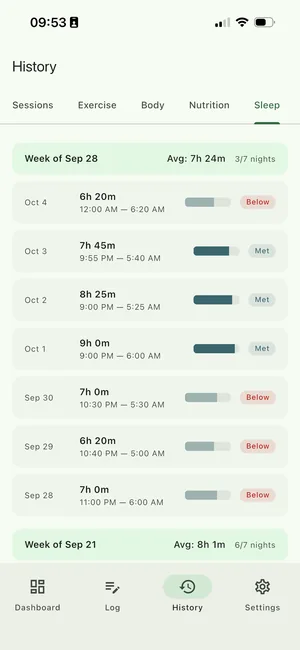
Log your sleep each day next to your training, and get alerts about your sleep and recovery.
Body measurements
Track your weight and measurements and see the weekly trend, so you know when you've hit a plateau.
Inside PowerLog
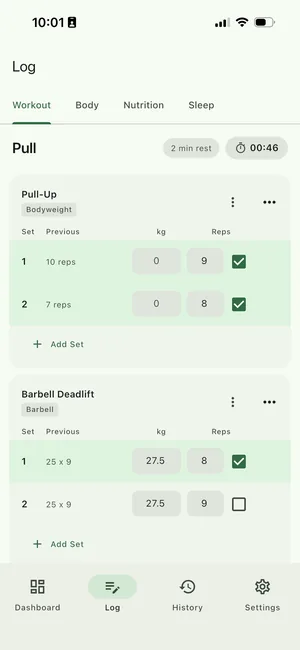
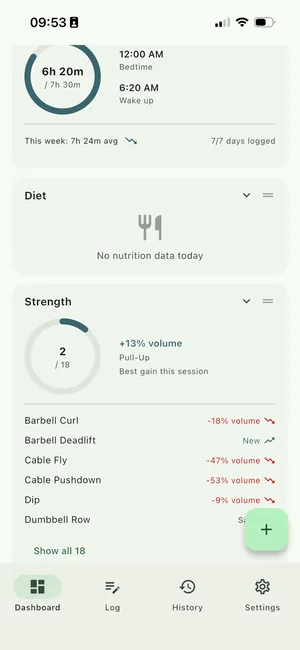
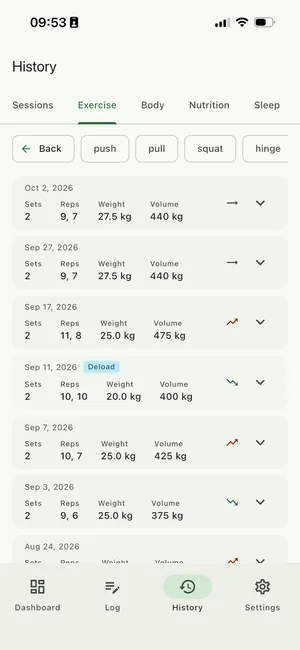
Log a set in a few taps, then see what's actually moving.
You own it
Pay once, keep your data, and don't depend on anyone's servers.
Subscription apps
- Pay every month
- Lose access when you stop paying
- Your data on their servers
PowerLog
- Pay once, updates included
- Keep it for as long as you like
- Your data on your phone
Your data stays on your phone
No account, no sync, no analytics. Export everything to CSV whenever you like. The only thing PowerLog sends is crash reports, and they never include your training or health data.
Works without signal
Log a set in a basement gym or on a flight. PowerLog works fully offline.
Nobody can switch it off
There's no PowerLog server and no account, so there's nothing to shut down. The app on your phone keeps working on its own.
How it works
Set up once, then a couple of taps a day.
Download
Get PowerLog from Google Play or the App Store. One purchase, updates included.
Set up your profile
A quick 3-step setup with smart defaults. Fine-tune anything later in Settings.
Start tracking
Log your training, food, sleep, and measurements — PowerLog surfaces trends and suggestions as you go.
Get a free training plan in two minutes.
Answer a few questions about your goal, experience, schedule, equipment and any injuries, and the builder puts together a weekly plan. Or build one yourself from 137 exercises. Adjust anything, download it, and load it into PowerLog.
Create your own plan- Fits you. Splits from 1 to 6 days a week, 30 to 90 minutes a session, with only the equipment you have: at home, in the gym, or in a hotel.
- Works around injuries. Choose common aches and pains and the plan leaves out exercises that often aggravate them.
- Stays private. It runs in your browser. Nothing is uploaded and there is no account.
The builder is not medical advice. Stop any exercise that causes pain, and ask your doctor or physiotherapist if you are unsure.
“I built PowerLog because most fitness apps want a subscription and your data just to log your sets, so plenty of people still use a notebook. I've lifted on and off since my twenties, and coming back after a break with young kids taught me what matters: lift hard, eat enough protein, sleep well. You don't need AI for that, just clear rules that tell you when to push and when to back off.”
Frequently asked questions
Is my data private?
Yes. PowerLog stores everything on your device. There is no account, no sync, and no analytics. The only thing it sends is crash reports, through Google's Firebase Crashlytics, so bugs can be fixed. They contain technical details about the error and your device, never your training or health data. The privacy policy has the details.
Is there a subscription?
No. PowerLog is a one-time purchase, with no recurring billing and no ads. Google Play and the App Store show the exact price in your currency, including local taxes. Subscriptions usually pay for servers, and PowerLog doesn't have any: everything runs on your phone.
Are future updates included?
Yes. Bug fixes and new features come as free updates, with no upgrade fee and no subscription.
What if PowerLog isn't for me?
On Google Play, you may be able to get a refund within 48 hours of buying. On iPhone, you can ask Apple for a refund at reportaproblem.apple.com. If something isn't working, write to support@indrik.eu so it can be fixed.
Do I have to track food and sleep?
No. Both are optional, and nutrition means your daily protein, carbs, and fat, not every meal. With them on, PowerLog can tell when sleep or nutrition might be holding your progress back. Turn them off and it focuses on your training.
What happens if I switch phones?
Export your full history to CSV from Settings, then import it on your new device. Nothing is tied to a cloud account, so you're always in control of your backups.
What platforms are supported?
PowerLog runs natively on Android and iOS. Get it on Google Play or the App Store.
Is PowerLog medical advice?
No. PowerLog is not medical advice. Its trend and recovery suggestions are general, rule-based guidance. Consult a professional before changing your training or diet.
Your training data, working for you.
Pay once. Works offline. No account needed.
One-time purchase, updates included.